

Your Tasks
The Tasks tab shows all the tasks that are assigned to you. This helps you keep track of your individual action items across different projects and spaces.
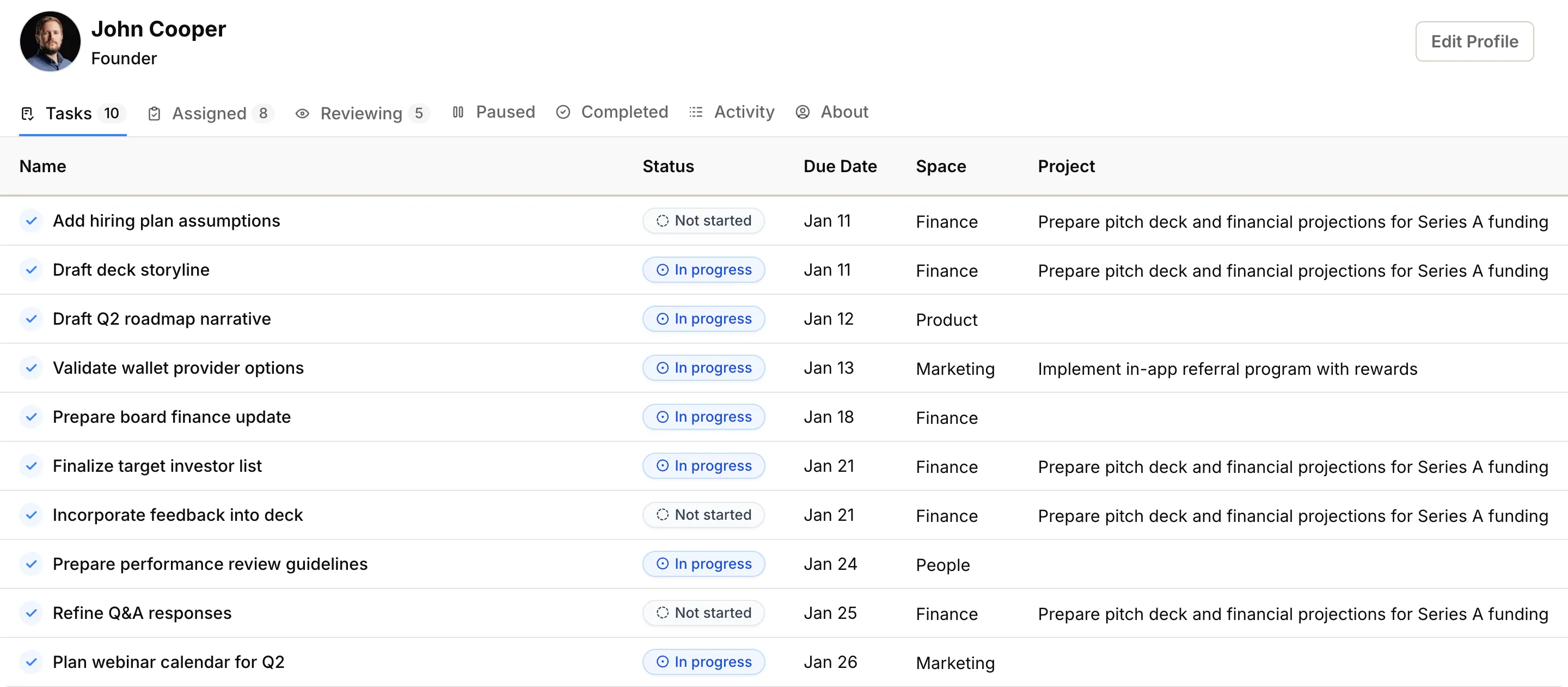
What you’ll see in the Tasks tab#
Section titled “What you’ll see in the Tasks tab#”The Tasks tab displays your assigned tasks in a table format, showing:
- Name — The title of the task
- Status — Current state of the task (e.g., Todo, In Progress)
- Due Date — When the task should be finished
- Assigned On — When the task was assigned to you
- Space — Which team or department owns the task
- Project — The project the task belongs to (if applicable; space tasks don’t have a project)
Managing your tasks#
Section titled “Managing your tasks#”This tab helps you organize your daily work. You can:
- Click on any task name to open its page where you can update the status, add comments, or change details
- Click on the project name to see the context of the task within its project
- Click on the space name to navigate to the team or department workspace