

Archive and restore tasks
With edit access, you can archive a closed task on an active project or space board. If the task is still open, move it to a closed status first.
Archive a closed task#
Section titled “Archive a closed task#”- Open Tasks in board layout (in a project) or open the named board (in a space).
- Open the closed task and choose Archive.
- Confirm with Archive task.
Find and restore a task#
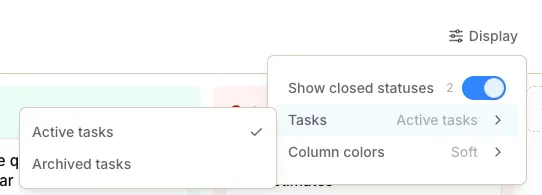
Section titled “Find and restore a task#”- On the same board, open Display → Tasks → Archived tasks.
- Open the task and choose Restore to board.
- Switch back to Active tasks.
Restored tasks keep their closed status. If the column is hidden, turn on Show closed statuses in Display.
To archive or restore an entire board, see Space Tools.